
Free animated photo book maker
Turn your photos and words into an editable book with smooth page-turn animation. Book Studio gives you a freeform canvas for each page, so you can build a photo album, illustrated story or animated scrapbook in your browser. It is free to use, with no account, paid credits or watermark.
Return to Book Studio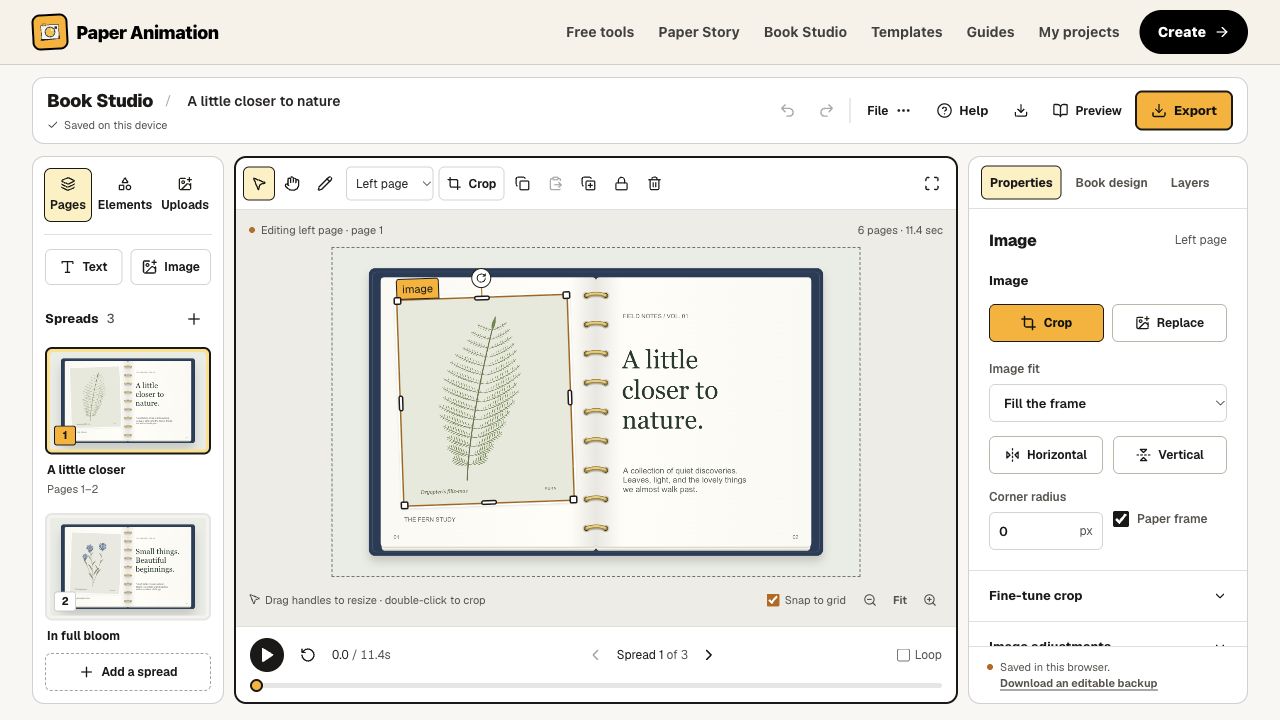
Make a page-turn animation
- Add your content. Choose the left or right page, then upload an image or add text. Use Elements for shapes, lines and freehand drawing.
- Arrange the pages. Drag, resize and rotate objects. Crop photos directly on the canvas, edit typography and use Layers for overlapping content.
- Build the book. Add or reorder spreads, choose a ring-bound or stitched binding, and adjust the cover, paper and backdrop colors.
- Preview and download. Set page timing, play the smooth turns and inspect any moment with the timeline. Choose an animation, a still spread or an editable backup.
Design every page your way
Start with an empty book and place content wherever it works for your story. Corner and edge handles resize objects; grouping, alignment, copy and paste help you arrange repeated elements. Undo lets you recover an accidental edit without rebuilding a page.
Use the book for travel memories, family photo collections, an illustrated portfolio or a short visual story. The same canvas supports a single large image, a collage with captions or a page built from text and drawings. You can create up to 12 spreads with 24 pages.
Projects autosave in this browser. Download an editable backup before moving devices or clearing browser data, and reopen saved work in My projects. The Privacy Policy explains local processing and site analytics.
Choose the file you need
Export the movement, keep a still spread or save a copy you can edit later. All rendering happens in your browser.
| Format | Output | Use it for |
|---|---|---|
| MP4 or WebM video | 1280 × 800 or 1920 × 1200 · 30 fps | A complete book with animated page turns. Encoding availability depends on your browser and device. |
| PNG image | 1920 × 1200 · current spread | A still image of the open book, including its paper, binding and backdrop. |
| Animated GIF | 640 × 400 · 15 fps · up to 12 seconds | A short, looping book animation. GIF uses a limited color palette. |
| Editable backup | .paperbook.json · all pages and images | A portable project copy for reopening, restoring or continuing work on another device. |
Book Studio exports book animations and images. PDF import, PDF export and hosted interactive flipbook links are not currently available.
Questions about Book Studio
What is an animated photo book maker?
An animated photo book maker arranges images and text on book pages, then turns those pages into a moving sequence. Book Studio lets you design both sides of each spread on a freeform canvas, preview the page turns and download the animation or a still image.
Is Book Studio free to use without an account?
Yes. Book Studio is free to use without signing up, buying credits or adding a payment card. Available exports do not include a Paper Animation watermark. You provide your own images and keep control of their placement, text and appearance.
Can I crop images and edit text on the book pages?
Yes. Add images, editable text, shapes, lines or drawings to either page. Drag objects to position them, resize from edges or corners, and rotate them. Double-click an image to crop it on the canvas, or double-click text to edit it. Layers, grouping, alignment and undo help with detailed compositions.
Which files can I download?
Download a page-turn animation as MP4 or WebM when your browser supports encoding it, a PNG image of the current spread, or an editable .paperbook.json backup containing the book and its images. Animated GIF is available for books up to 12 seconds, at 640 × 400 pixels and 15 frames per second. Video export offers 1280 × 800 or 1920 × 1200 at 30 frames per second.
Are my photos uploaded or saved in the cloud?
Creative images, text, page rendering and exports stay in your browser. Projects autosave in local browser storage on the current device. There is no cloud sync, and clearing browser data can remove locally saved books. Download an editable backup to keep a separate copy. The site still downloads application assets and fonts; the Privacy Policy explains site analytics.
Can I make a PDF flipbook or publish a hosted book link?
Book Studio creates editable photo books and downloadable page-turn animations. It does not currently import PDFs, export PDFs or publish a hosted interactive flipbook. Use video or GIF for a moving book, PNG for a still spread, and an editable backup to continue working in Book Studio.
How many book pages can I create?
A book can contain up to 12 spreads, giving you 24 pages. Add, duplicate, reorder or remove spreads, then set the time spent on each spread and the duration of each turn. Each page supports up to 30 editable objects. Longer books need a video format when they exceed the 12-second GIF limit.
How do I reopen a book on another device?
Choose Backup or Export → Editable backup to download a .paperbook.json file with every page and image included. On the other device, open Book Studio and use File → Open project copy. The imported book opens as a separate project. A local project URL alone does not transfer your images or create a shareable cloud book.