
Everyday story · 32s
A note for tomorrow
A small everyday story: a loose thought becomes a line in a notebook, then a reason to return.
Turn a script and photos into a paper animation with free AI voiceover. Made in your browser.
Hear a voiceover sampleSeparate the moments with ---. Add a few words, a voiceover, and what the paper should do.
Start with a title. Put --- on its own line between moments. Each moment says what we see, what we hear, and how the paper moves.
Title: A little idea

---
Scene: opening
Duration: 6s
Text: An idea lands.
Voice: A little idea can be the start of something.
Visual: notes
Action: arrive

---
Scene: story
Duration: 8s
Text: The pieces find a place.
Voice: Move the pieces around until the story starts to take shape.
Visual: notebook
Action: gather
Scene, Duration, and Text are required for each moment. Voice is what you plan to say; Detail adds a little on-screen copy. You can leave these out for a silent visual story.
Use opening, story, sequence, change, focus, quote, photo, or ending for the scene. A sequence uses Steps: with 2–4 bullet lines. A change uses Before: and After:. A focus uses Value: and Meaning:.
Visual: notes, notebook, or loop. Action: arrive, reveal, gather, replace, scatter, or drift. Photos are added in the editor. Record or upload audio for your written voiceover.
You can also set Format: 16:9, 9:16, or 1:1; Theme: studio, editorial, or botanical; and Motion: calm, editorial, or energetic beneath the story title. These are optional.
Up to 8 moments, 2–12 seconds each, and 60 seconds altogether. Keep the on-screen words short and give the voiceover time to breathe.
Up to 8 scenes · 60 seconds · 1080p
Free. No account, credits, or watermark.
Little stories with a beginning, a turn, and a finish. Change the words and make them yours.
A small everyday story: a loose thought becomes a line in a notebook, then a reason to return.
A fictional notebook gathers the pieces of a day. A vertical paper film with room for your own product photos.
Loose scraps find a connection, gather into a path, and become one clear story.
Your story stays here. The paper, pictures, voiceover, and video are put together on your device. Download a backup to keep a separate copy.
Turn your scene script into English speech with Paper Story's free AI voiceover generator. Choose a synthetic narrator, listen to the result, then download WAV audio or include the narration in your paper story video.
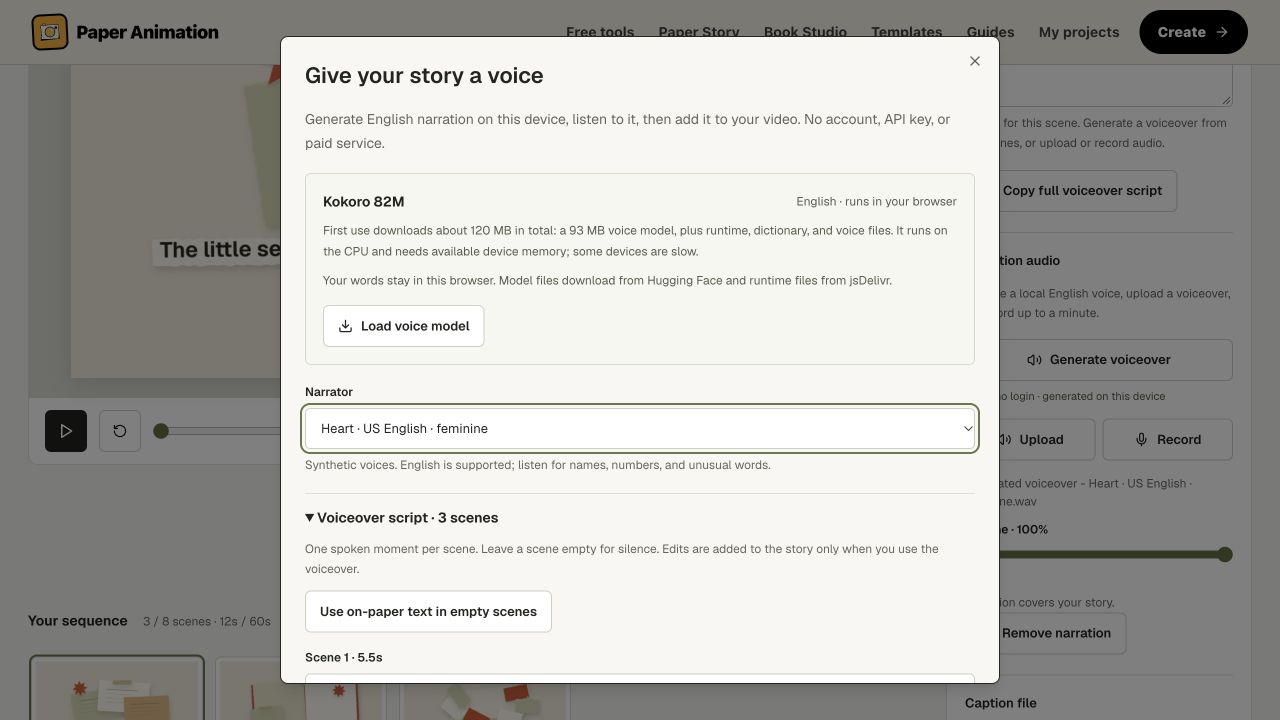
Your script is spoken on your device using Kokoro. There is no login, credit pack or paid API. The first download is about 120 MB; it starts only when you choose Load voice model.
Open the Paper Story makerCreate or open a story, then choose Audio → Generate voiceover.
This is actual generated speech. A three-second pause separates the two spoken scenes.
Transcript
One small seed waits inside a paper envelope, ready for its place in the sun. The first green leaf reaches toward the light.
Download this voice sample as WAV--- between scenes, or use an editable template. Each scene can have a Voice: line with the words to speak.Paper Story aligns each spoken clip with its scene and fills unused time with silence. If a sentence needs longer, you can review the proposed extension before applying it. Each scene runs for 2–12 seconds, with a 60-second story limit. Speech that exceeds these limits needs a shorter script; words are not cut off to make it fit.
After changing the scene order, timing or spoken words, generate a new voiceover. Undo restores the audio, script and timing that were in place before you applied the generated result.
The four synthetic voices support US English. Listen carefully to names, numbers and unusual words. For another language, upload narration or record it in the Audio tab.
Voice generation requires a modern browser with Web Workers, WebAssembly and available memory. It does not require a GPU. Model files are downloaded over the network; your narration text is processed locally. Read the privacy details.
Yes. Making a story, generating an English voiceover and using the available exports cost $0. No account, payment card, credit pack or API key is required. Paper Animation adds no watermark to your video. Voice generation runs on your device after you choose to download the model; the first download is about 120 MB including runtime and voice files.
Create or open a Paper Story, choose the Audio tab, then Generate voiceover. Review the narration for every scene, choose a voice and load the voice model. Choose Create voiceover and listen to the result. Use voiceover adds it to the story; Download WAV saves the audio separately. An empty scene stays silent. Use on-paper text in empty scenes is an optional shortcut.
Yes. Download WAV saves the generated audio without applying it to the story. Use voiceover adds it to your current project, and Export film includes the narration in a 720p or 1080p MP4 or WebM where your browser supports encoding. You can also export scene PNGs, SRT captions and a portable .paperstory backup. Captions are written separately; spoken text does not automatically create captions.
Four US English synthetic voices are available: Heart, Bella, Michael and Puck. English is the supported generation language. Listen before using the result, especially for names, numbers and unusual words. For narration in another language, upload an audio file or record your microphone in the Audio tab.
No. Voice generation uses the CPU through WebAssembly in a background Web Worker. It needs a modern browser, available device memory and an initial download of about 120 MB. Speed depends on your device. The separate, optional AI story planner uses WebGPU and a larger model download; you do not need to load that planner to generate a voiceover.
Voiceover text and generated audio are processed in the local browser worker, rather than sent to a hosted speech API. Model and voice files download from Hugging Face; runtime files download from jsDelivr. Applied narration saves with the project on this browser and device. Download a project backup to keep a separate copy. The Privacy Policy explains site analytics separately.
Each spoken clip starts at its scene boundary, with silence filling unused time. If speech needs more time, Paper Story shows proposed scene extensions before applying the voiceover. A scene can run for 2–12 seconds and a complete story for up to 60 seconds. Speech that exceeds those limits is rejected rather than cut off. After changing spoken words, scene order or timing, generate a new voiceover; an existing WAV does not update automatically.
Yes. Plan with local AI is a separate optional browser tool that drafts four connected moments in the readable text script format. It requires WebGPU, about a 1.1 GB first model download and roughly 3 GB of GPU memory, sometimes more. Review its words and facts before applying the draft. You can also write the script yourself or use Get a writing prompt with another writing tool. Photos are supplied separately.